

Editor’s note: This post is part of the AI Decoded series, which demystifies AI by making the technology more accessible, and showcases new hardware, software, tools and accelerations for RTX PC users.
Generative models have completely transformed the AI landscape — headlined by popular apps such as ChatGPT and Stable Diffusion.
Paving the way for this boom were foundational AI models and generative adversarial networks (GANs), which sparked a leap in productivity and creativity.
NVIDIA’s GauGAN, which powers the NVIDIA Canvas app, is one such model that uses AI to transform rough sketches into photorealistic artwork.
How It All BeGAN
GANs are deep learning models that involve two complementary neural networks: a generator and a discriminator.
These neural networks compete against each other. The generator attempts to create realistic, lifelike imagery, while the discriminator tries to tell the difference between what’s real and what’s generated. As its neural networks keep challenging each other, GANs get better and better at making realistic-looking samples.
GANs excel at understanding complex data patterns and creating high-quality results. They’re used in applications including image synthesis, style transfer, data augmentation and image-to-image translation.
NVIDIA’s GauGAN, named after post-Impressionist painter Paul Gauguin, is an AI demo for photorealistic image generation. Built by NVIDIA Research, it directly led to the development of the NVIDIA Canvas app — and can be experienced for free through the NVIDIA AI Playground.
GauGAN has been wildly popular since it debuted at NVIDIA GTC in 2019 — used by art teachers, creative agencies, museums and millions more online.
Giving Sketch to Scenery a Gogh
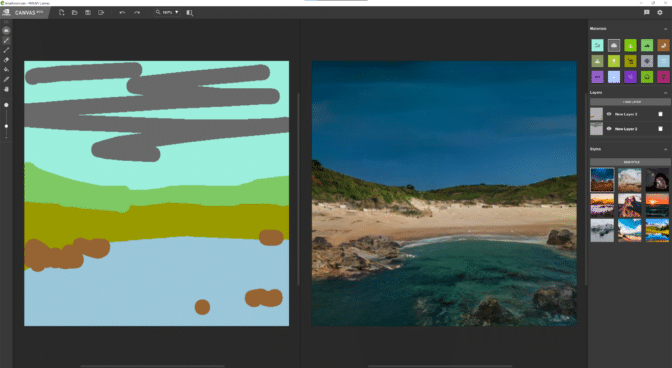
Powered by GauGAN and local NVIDIA RTX GPUs, NVIDIA Canvas uses AI to turn simple brushstrokes into realistic landscapes, displaying results in real time.
Users can start by sketching simple lines and shapes with a palette of real-world elements like grass or clouds —- referred to in the app as “materials.”
The AI model then generates the enhanced image on the other half of the screen in real time. For example, a few triangular shapes sketched using the “mountain” material will appear as a stunning, photorealistic range. Or users can select the “cloud” material and with a few mouse clicks transform environments from sunny to overcast.
The creative possibilities are endless — sketch a pond, and other elements in the image, like trees and rocks, will reflect in the water. Change the material from snow to grass, and the scene shifts from a cozy winter setting to a tropical paradise.

Canvas features a Panorama mode that enables artists to create 360-degree images for use in 3D apps. YouTuber Greenskull AI demonstrated Panorama mode by painting an ocean cove, before then importing it into Unreal Engine 5.
Download the NVIDIA Canvas app to get started.
Consider exploring NVIDIA Broadcast, another AI-powered content creation app that transforms any room into a home studio. Broadcast is free for RTX GPU owners.
Generative AI is transforming gaming, videoconferencing and interactive experiences of all kinds. Make sense of what’s new and what’s next by subscribing to the AI Decoded newsletter.