

NVIDIA today announced an update to RTX Video Super Resolution (VSR) that delivers greater overall graphical fidelity with preserved details, upscaling for native videos and support for GeForce RTX 20 Series desktop and laptop GPUs.
For AI assists from RTX VSR and more — from enhanced creativity and productivity to blisteringly fast gaming — check out the RTX for AI page.
Plus, this week In the NVIDIA Studio, Twitch personality Runebee shares her inspiration, streaming tips and how she uses AI and RTX GPU acceleration.
And don’t forget to join the #SeasonalArtChallenge by submitting spooky Halloween-themed art in October and harvest- and fall-themed pieces in November. For inspiration, check out the hauntingly adorable work of artists like iryna.blender3d on Twitter.
The #SeasonalArtChallenge continues on with an incredible render from iryna.blender3d (IG).
Share your spooky/Halloween-themed art with #SeasonalArtChallenge for a chance to be featured on the Studio or @NVIDIAOmniverse channels!
pic.twitter.com/lOxcYNhBJl
— NVIDIA Studio (@NVIDIAStudio) October 9, 2023

The Super RTX VSR Update 1.5
RTX VSR’s AI model has been retrained to more accurately identify the difference between subtle details and compression artifacts to better preserve image details during the upscaling process. Finer details are more visible, and the overall image looks sharper and crisper than before.

RTX VSR version 1.5 will also de-artifact videos played at their native resolution — prior, only upscaled video could be enhanced. Providing a leap in graphical fidelity for laptop owners with 1080p screens, the updated RTX VSR makes 1080p resolution, which is popular for content and displays, look smoother at its native resolution, even with heavy artifacts.
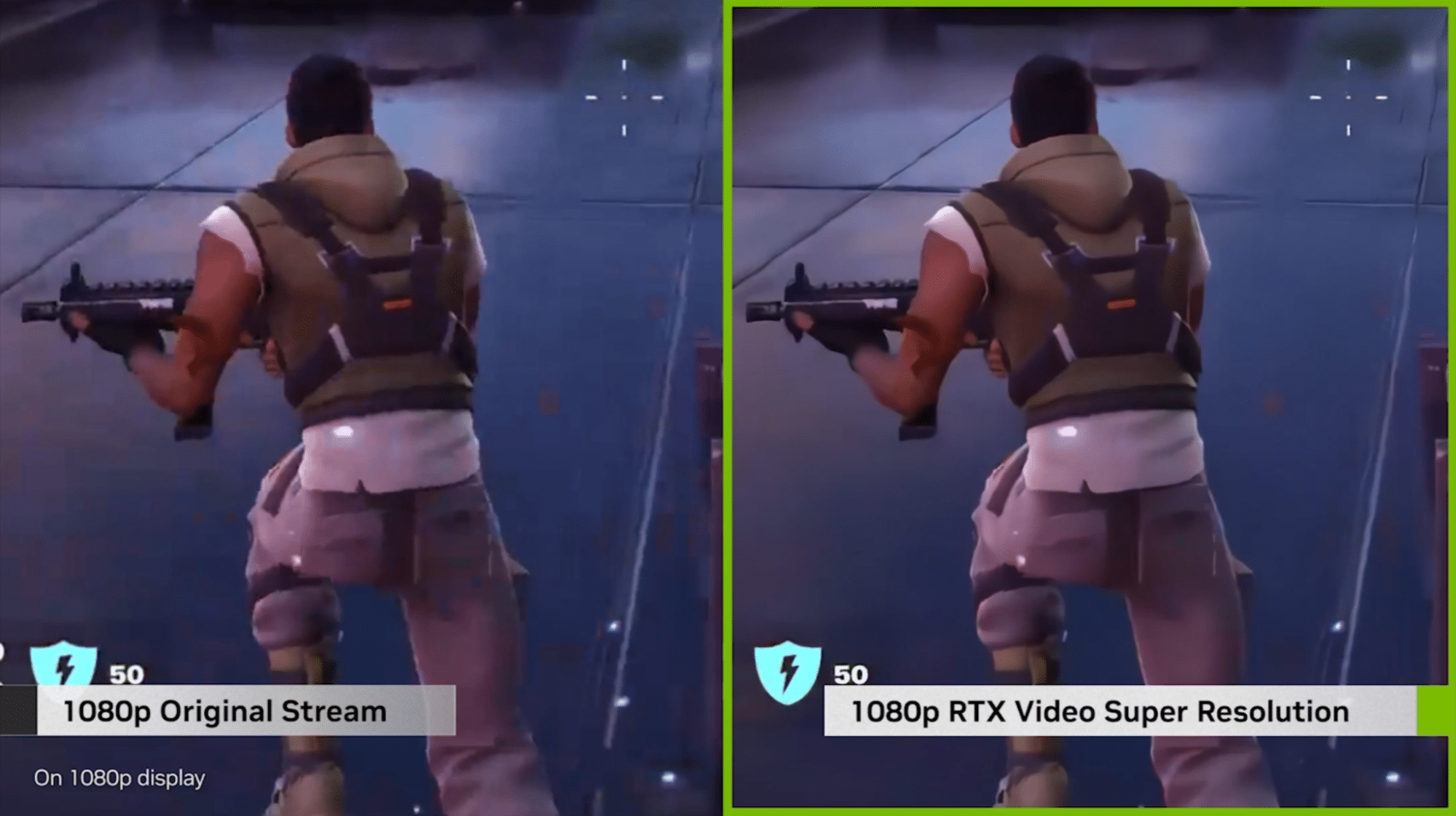
And with expanded RTX VSR support, owners of GeForce RTX 20 Series GPUs can benefit from the same AI-enhanced video as those using RTX 30 and 40 Series GPUs.
RTX VSR 1.5 is available as part of the latest Game Ready Driver, available for download today. Content creators downloading NVIDIA Studio Drivers — designed to enhance features, reduce repetitiveness and dramatically accelerate creative workflows — can install the driver with RTX VSR releasing in early November.
Runebee-lievable Streaming
Runebee has been livestreaming for over 10 years, providing a space for viewers to hang out and talk about games, movies or whatever else is going on in life. Over the years, she’s realized how common a desire for escapism is.
“Things aren’t always sunshine and rainbows, so it’s nice to have some company that can help take your mind off things,” said Runebee.
Runebee has amassed over 100K followers on Twitch, YouTube and Instagram, crediting her success to thorough preparation of her setup. Her technology-forward approach ensures efficiency and reliability — allowing her focus to be on performance.
“There’s a lot of planning involved in streaming, but at the end of the day, hitting the ‘start streaming’ button is the most important step, and NVIDIA GPU-acceleration is a massive factor in allowing it to go as smoothly as it does,” said Runebee.
“I never thought I’d have this smooth of a stream just by upgrading to a GeForce RTX 40 Series GPU.” – Runebee
OBS is Runbee’s preferred open-source software for video recording and livestreaming on Twitch. For maximum efficiency, Runebee deploys her GeForce RTX 4080 RTX GPU, taking advantage of the eighth-generation NVIDIA encoder, NVENC, to independently encode video, which frees up the graphics card to focus on livestreaming.
“Streaming games and running OBS used to kill my CPU, and NVENC has taken so much stress off,” said Runebee. “I was hardly even able to stream PC games until I switched to NVENC.”
For livestreamers, RTX 40 Series GPUs can offer support for real-time AV1 hardware encoding, providing a 40% efficiency boost compared to H.264 and delivering higher quality than competing GPUs.
“As I started building more PCs with NVIDIA GPUs, I never had a reason to switch!” – Runebee
Runebee can export recordings of her livestreams with Adobe Premiere Pro in half the normally required time thanks to GeForce RTX 40 Series dual encoders working together, dividing the work evenly to double output.
They’re capable of recording up to 8K, 60 frames per second content in real time via GeForce Experience and OBS Studio.
Always looking to improve her livestreaming process, Runebee plans on experimenting with the NVIDIA Broadcast app, which transforms any room into a home studio by upgrading standard webcams, microphones and speakers into premium smart devices using the power of AI.
Runebee encourages those interested in livestreaming to at least give their potential passion project a shot. “It’s a great way to meet tons of new friends, become more articulate at describing the things you love — be it games or movies — and cultivate a community to share your passions with,” she said.

Follow Runebee on Twitch.
Follow NVIDIA Studio on Instagram, Twitter and Facebook. Access tutorials on the Studio YouTube channel and get updates directly in your inbox by subscribing to the Studio newsletter. See notice regarding software product information.